


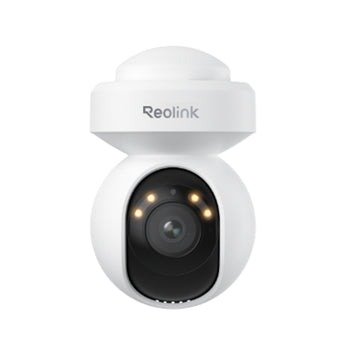


Reolink E1 Outdoor SE PoE 4K Auto-Tracking PoE Camera
- Outdoor entrances
- Gardens & yards
Pickup available at Elechid
Usually ready in 24 hours
Reolink E1 Outdoor SE PoE 4K IP camera with auto tracking, 355° pan and 50° tilt. Combine wired power/data with microSD or compatible NVR storage for outdoor monitoring.
Suitable uses
Suitable for a shop entrance, corridor or viewpoint with planned network cabling. Plan the PoE connection around the site’s power and network equipment and the recording methods listed here; check recorder model and firmware compatibility.
Key features
- 355° pan; 50° tilt; 10x digital zoom defines the camera's coverage so you can match its view to the installation position.
- Power over Ethernet carries data and power on one network cable, making the cable route easier to plan around the mounting position.
- Local recording lets you keep footage on a suitable microSD card or compatible Reolink recorder, with continuous, scheduled and event recording options.
- Infrared night vision is rated up to 12m, helping maintain a view after dark; actual results depend on the scene.
Specifications
| Image | 4K 8MP at up to 25fps |
|---|---|
| Lens / view | 355° pan; 50° tilt; 10x digital zoom |
| Connection | Wired Ethernet; active PoE (802.3af) |
| Local recording | microSD / compatible Reolink NVR |
| Night vision | Infrared up to 12m |
| Model reference | PCE1PT4K02 |
Package and requirements
One E1 Outdoor SE PoE camera; final regional mounting accessories and cable contents should be confirmed against the supplied carton.
A suitable IEEE 802.3af active PoE source and Ethernet cabling are required. Confirm recorder hardware and firmware compatibility before purchase. Memory card and recorder are separate unless expressly supplied. Recording duration depends on capacity, bitrate and recording settings.
Compare and plan your system
Browse compare security cameras and recorders and security camera accessories; for another model, see Reolink TrackMix PoE camera.
For manufacturer information, see official product information.
Choosing a monitoring system? Read our Hong Kong home CCTV buying guide to compare power, connectivity and recording options, or browse security cameras and IP cameras.
When it arrives: first setup and checks
- Power up in an accessible position, and check package contents. Use the exact model's manufacturer instructions and app prompts to add it. Do not substitute another version's pairing or reset procedure.
- Use the compatible PoE equipment or specified power source required by this model, with an Ethernet connection. An ordinary router LAN port does not imply PoE power.
- Configure account/device security and viewing permissions using this model’s supported settings. Check date, time, notifications and framing.
- Enable a supported card, NVR/hub or cloud recording method. Test recording, playback and storage location before permanent mounting. Live view does not mean recording is active.
Setup reference: Reolink manufacturer setup and support Choose the matching model and hardware version. This self-setup checklist does not include on-site or done-for-you setup services.


