NVRs & Security Camera Accessories
Build or expand a home or shop security system with NVRs, camera storage hubs, PoE switches, solar panels, backup batteries, mounts, junction boxes and cloud recording plans. Start with your camera's full model number, then match recording support, power and storage. A matching connector alone does not establish compatibility.
Choose an NVR, storage hub or cloud recording plan
NVRs for multi-camera recording
Compare network video recorders for multiple entrances, shops or storerooms. Check recording channels separately from PoE ports, along with resolution, codecs, hardware version and storage limits. The Reolink NVS8 with a 2TB hard drive and NVS16 without a hard drive have different package contents. Diskless versions need a compatible drive. Continuous and event recording depend on the connected cameras, recorder and settings.
Home Hubs for supported cameras
To bring compatible Reolink cameras together, compare the Home Hub with 64GB microSD and Home Hub Pro with a 2TB hard drive. Storage, camera limits and supported models differ. Check the manufacturer's list against the camera model, hardware and firmware, especially for battery and 4G cameras.
Cloud recording by brand, region and camera
Cloud services keep footage that has successfully uploaded to your account. Check the subscription term separately from video retention, supported camera count, and event or continuous recording. The SpotCam Cloud NVR one-year plan is a cloud service, not a physical recorder. Confirm camera support, account region and network requirements before activation.
Match accessories to power and installation needs
PoE switches, adapters and extension cables
Match the camera's PoE standard and power requirement. For devices such as the Reolink RLA-PS1E PoE switch, check powered ports, per-port output, total power budget and network connections. DC adapters and extensions must match voltage, current, polarity and connector; 5V and 12V accessories are not interchangeable simply because the brand matches.
Solar panels and backup batteries
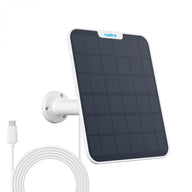
Choose solar panels and battery accessories for the specified camera model. The SpotCam Solar Panel Pro and Reolink RLA-BP1 backup battery have defined compatibility requirements. Solar charging varies with sunlight, placement and power use; backup runtime also depends on the connected equipment and recording workload.
Mounts, brackets and junction boxes
Check camera shape, screw positions, load and mounting direction. A compatible junction box helps organise connections, but outdoor fittings still need appropriate sealing and fixing. Check protection requirements for the camera, power equipment and connectors separately.
Four checks before ordering
- Exact model and version: Wi-Fi, PoE, battery and 4G versions in one range may support different accessories.
- Storage and recording: confirm whether a drive or card is included, supported capacity, camera channels and recording modes.
- Power and connection: check PoE or PoE+, DC voltage, connectors, cables and network equipment.
- Published compatibility: confirm the specific pairing. A shared brand, ONVIF label or connector does not guarantee every function.
Still choosing cameras? Explore home CCTV, PoE and 4G security cameras or read our Hong Kong home CCTV buying guide before planning storage and power.
Frequently asked questions
Does every NVR include a hard drive and PoE power?
No. Packages may include a drive or be diskless, and some recorders have no PoE ports. Check the specific configuration; recording channels do not always equal PoE ports.
Can cameras and recorders from different brands work together?
Check the exact pairing first. Even when video is available, detection, audio, playback or other functions may be limited. Hardware and firmware versions can affect support.
Does local recording need a monthly subscription?
Supported local storage can record according to the device's functions. Cloud and additional services have separate plan terms. Remote access may still require a network connection.
Hong Kong warranty, delivery and collection
Check the product page and confirmed quotation for version, warranty, included items and stock. Kwun Tong collection is by appointment; confirm availability and a time before visiting. On-site demonstrations and testing are unavailable. See our shipping policy or WhatsApp your camera model to ask about compatible accessories.
Before ordering, use our how to choose different cameras for the living room, entrance and rooftop; first CCTV order checklist: power, recording and necessary accessories to list each viewpoint and the equipment requirements to confirm.
CCTV operation and management guides
Before saving important footage, check its storage location, account permissions and supported export method. The guide uses Reolink and EZVIZ documentation; features differ by model.
An accessory bundle must match the complete recording path
A recorder, memory card and cloud plan solve different storage needs. Reolink camera/NVR compatibility is hardware-specific; EZVIZ CloudPlay eligibility and terms are region- and device-dependent. Do not assume that buying one storage accessory enables every camera function or a particular retention period.
Choose NVR hardware and supported disks separately from camera-compatible microSD cards, then calculate the intended recorded streams and hours.
Evidence and scope
- Reolink NVR hardware and camera compatibility tables
- EZVIZ CloudPlay service and regional conditions
- Reolink model-specific microSD requirements
Sources checked 23 October 2026. Published guidance and model-specific specifications; no Elechid hands-on or on-site performance test is claimed. Match the actual supply version and service terms.