


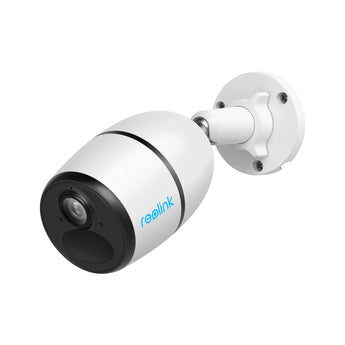


Reolink Go Plus 4MP 4G LTE Battery Camera
- No-Wi-Fi locations
- Outdoor entrances
- Gardens & yards
Pickup available at Elechid
Usually ready in 24 hours
Reolink Go Plus 4MP 4G LTE battery security camera for locations without Wi-Fi. Features infrared night vision, person/vehicle detection and two-way audio; SIM data is required.
Suitable uses
Suitable for monitoring a location without fixed Wi-Fi where compatible mobile coverage is available. Battery power helps with placement; arrange a suitable SIM, data plan and charging routine.
Key features
- A 4G LTE connection lets the camera send live views and alerts at sites without a Wi-Fi network or fixed broadband.
- 4MP video and infrared night vision support monitoring of a selected fixed area through the day and after dark.
- Rechargeable battery power and compatible solar-panel support provide alternatives to a mains outlet near the camera.
- Person and vehicle detection helps identify relevant events; the built-in microphone and speaker support two-way communication from the app.
Specifications
| Listed resolution | 2K 4MP |
|---|---|
| Connection | 4G LTE mobile network |
| Model | B4GB2K01 |
| Power arrangement | Rechargeable battery; compatible solar optional |
| Night vision | Infrared |
Package and requirements
One Reolink Go Plus 4MP 4G LTE Battery Camera. A recording card and recorder are separate purchases. Confirm the supplied regional power lead and mounting fittings before installation.
A compatible regional LTE version, supported data SIM and active mobile data plan are required. Check local carrier bands and signal at the installation point before purchase; mobile data charges are separate. Battery runtime and solar charging depend on recording settings, activity, temperature and sunlight. Solar support does not guarantee uninterrupted power or continuous recording.
Compare and plan your system
Browse compare security cameras and recorders and security camera accessories; for another model, see Reolink Go Ultra 4G camera.
For manufacturer information, see official product information.
Choosing a monitoring system? Read our Hong Kong home CCTV buying guide to compare power, connectivity and recording options, or browse security cameras and IP cameras.
When it arrives: first setup and checks
- Power up in an accessible position, charging battery models as instructed, and check package contents. Use the exact model's manufacturer instructions and app prompts to add it. Do not substitute another version's pairing or reset procedure.
- For 4G, check SIM activation, a suitable data plan and on-site signal. On dual-connection models, configure the 4G or Wi-Fi mode you intend to use.
- Configure account/device security and viewing permissions using this model’s supported settings. Check date, time, notifications and framing.
- Enable a supported card, NVR/hub or cloud recording method. Test recording, playback and storage location before permanent mounting. Live view does not mean recording is active. Battery models do not all support continuous recording.
Setup reference: Reolink manufacturer setup and support Choose the matching model and hardware version. This self-setup checklist does not include on-site or done-for-you setup services.


