


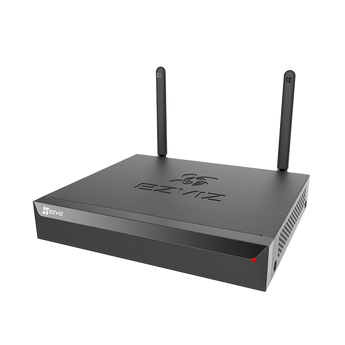


EZVIZ X5S 8-Channel Wireless NVR with HDMI & VGA
- Home systems
- Shop systems
- Multiple entrances
Pickup available at Elechid
Usually ready in 24 hours
EZVIZ X5S 8-channel wireless NVR with HDMI and VGA for viewing compatible cameras and local recordings. SATA hard drive sold separately; check model compatibility.
Suitable uses
Suitable for a shop or small office that needs to view several compatible cameras and keep footage locally. Plan around physical ports, supported channels, drive configuration and camera compatibility; use the power arrangements specified on this page.
Key features
- Up to 8 cameras at 3K: Link up to 8 mains-powered EZVIZ Wi-Fi cameras through its own hotspot, or connect wired cameras through your router.
- Watch on a big screen: HDMI and VGA outputs show all cameras at once on a monitor, and footage can also be viewed remotely in the EZVIZ app.
- Local storage with H.265: One internal SATA bay takes a 3.5-inch disk up to 8 TB (sold separately), and H.265 compression helps save space.
Specifications
| Camera channels | Up to 8 cameras (wireless or wired), up to 3K each |
|---|---|
| Compatible cameras | Mains-powered EZVIZ Wi-Fi cameras; ONVIF (2.5) and Hikvision-protocol cameras. Battery cameras, doorbells and doorphones not supported |
| Wireless | 2.4 GHz, 2 antennas, range up to 100 m in open space |
| Video outputs | HDMI up to 2592 × 1944 / 30 Hz; VGA up to 1920 × 1080 / 60 Hz (same image as HDMI) |
| Hard disk | 1 × internal SATA, 3.5-inch, 1 to 8 TB; not included |
| Recording | H.265 / H.264; manual, motion, scheduled and event recording |
| Ports | 1 × 10/100 Mbps Ethernet, 2 × USB 2.0 (mouse, backup); no audio in/out |
| Power | DC 12 V / 1.5 A; standby max. 8 W |
| Size / weight | 235 × 270 × 44.5 mm, 932 g |
In the box: X5S NVR, power adapter, mouse, HDD screw kit, SATA data cable, SATA power cable, regulatory information, quick start guide
Warranty and delivery
This is Hong Kong licensed stock, covered by the local distributor's warranty; the period is shown on the warranty card in the box. Brand new. Kwun Tong collection is by appointment; confirm availability and a collection time before travelling. No demonstrations or product trials are provided.
Delivery by SF Express, freight collect. Free self-collection at our Kwun Tong shop (11:00–19:00). For other arrangements, please WhatsApp us.
FAQ
Can I add cameras from other brands?
EZVIZ lists ONVIF (version 2.5) and Hikvision protocol support, so some third-party IP cameras may work. Check your camera's ONVIF support before buying.
Related buying guides
- EZVIZ SD7 7-Inch Touch Screen Smart Monitor
- EZVIZ R5C 8-Channel Home NAS / NVR (No Hard Disk)
- EZVIZ H1C 1080P Indoor Wi-Fi Camera
- Hong Kong CCTV buying and setup guide
- Returns and refund policy
- Shipping policy
- Export and Back Up CCTV Footage: App, NVR and Cloud Guide
Choosing a monitoring system? Read our Hong Kong home CCTV buying guide to compare power, connectivity and recording options, or browse NVRs and camera storage hubs.
When it arrives: first setup and checks
- Check the exact recorder or hub model, hardware version, package contents and installed storage. A drive-free model needs separately purchased supported storage. Follow its instructions for power, router and any required display connections.
- Initialise the device using its manufacturer workflow, set a device password in your own account and add supported cameras. The same brand or an Ethernet socket alone does not prove compatibility.
- Check each camera's date, time and recording schedule. Make a test recording, play it back and try exporting a clip. Retention varies with camera count, bitrate, recording mode and usable storage.
Back up footage before formatting or resetting. NVR and Home Hub setup screens and supported features differ.
Setup reference: EZVIZ manufacturer setup and support Choose the matching model and hardware version. This self-setup checklist does not include on-site or done-for-you setup services.


