


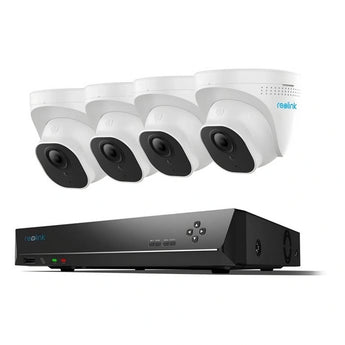


Reolink NVS8-5MD4 5MP PoE Dome Camera Kit with 2TB HDD
- Home systems
- Shop systems
- Multiple entrances
Pickup available at Elechid
Usually ready in 24 hours
Reolink NVS8-5MD4 kit combines four 5MP dome cameras, an 8-port PoE NVR and a pre-installed 2TB HDD. Choose continuous, scheduled or event recording for your premises.
Suitable uses
Suitable for planning wired monitoring across a shop, multiple entrances or a small office. Lay out network cables and viewpoints around the cameras listed in this kit, then plan recording retention from resolution, schedule and drive capacity.
Key features
- Four 5MP cameras let you cover separate locations while keeping their recordings together on the same recorder for a simpler review process.
- Person and vehicle detection helps you find relevant activity, with alerts and playback available through the Reolink App or Client.
- The supplied 2TB hard drive supports local continuous recording, so the system can retain footage from before and after an event.
- PoE connections reduce the need for separate power sockets beside each camera, while the recorder provides a central point for system setup.
Specifications
| Cameras | 4 × 5MP dome cameras |
|---|---|
| Recorder | NVS8; 8 physical PoE ports |
| Supplied storage | 2TB HDD pre-installed |
| Recording | Continuous, motion-triggered and scheduled |
| Model reference | PS2KD02-8 |
Package and requirements
Four dome cameras, one NVS8 recorder and one pre-installed 2TB HDD. Confirm regional Ethernet cable lengths, power lead and mounting accessories against the supplied carton.
Camera models and NVR hardware revisions can change between packs; confirm the supplied configuration before adding more cameras. Storage retention depends on bitrate, resolution and recording schedule. Provide power and ventilation for the indoor NVR. Remote access requires a working network connection.
Compare and plan your system
Browse compare security cameras and recorders and security camera accessories; for another model, see Reolink P340 PoE camera.
For manufacturer information, see official product information.
Choosing a monitoring system? Read our Hong Kong home CCTV buying guide to compare power, connectivity and recording options, or browse NVRs and camera storage hubs.
When it arrives: first setup and checks
- Check the exact recorder or hub model, hardware version, package contents and installed storage. A drive-free model needs separately purchased supported storage. Follow its instructions for power, router and any required display connections.
- Initialise the device using its manufacturer workflow, set a device password in your own account and add supported cameras. The same brand or an Ethernet socket alone does not prove compatibility.
- Check each camera's date, time and recording schedule. Make a test recording, play it back and try exporting a clip. Retention varies with camera count, bitrate, recording mode and usable storage.
Back up footage before formatting or resetting. NVR and Home Hub setup screens and supported features differ.
Setup reference: Reolink manufacturer setup and support Choose the matching model and hardware version. This self-setup checklist does not include on-site or done-for-you setup services.


