


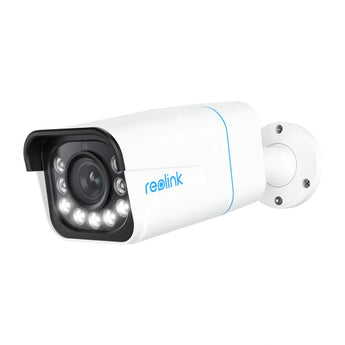


Reolink P430 4K PoE Bullet Camera with 5x Optical Zoom
- Outdoor entrances
- Gardens & yards
Pickup available at Elechid
Usually ready in 24 hours
Reolink P430 4K PoE bullet IP camera with 2.7–13.5 mm 5x optical zoom lens, spotlight colour night vision, person/vehicle/animal alerts and IP67 housing.
Suitable uses
Suitable for a shop entrance, corridor or viewpoint with planned network cabling. Plan the PoE connection around the site’s power and network equipment and the recording methods listed here; check recorder model and firmware compatibility.
Specifications
| Image sensor | 1/2.8" CMOS |
|---|---|
| Resolution | 3840 × 2160 (8MP) at 25 fps |
| Lens / zoom | 2.7–13.5 mm motorised, F1.6–3.3; 5x optical zoom |
| Field of view | Horizontal 105°–31°; vertical 55°–17° |
| Night vision | Infrared up to 30 m; colour night vision with 450-lumen spotlights |
| Smart detection | Motion, person, vehicle and animal detection |
| Audio | Two-way audio, built-in microphone and speaker |
| Power | PoE (IEEE 802.3af, 48V active) or DC 12V 1A |
| Network / storage | One 10/100 Mbps RJ45 port; microSD card up to 256GB (not included) or Reolink NVR |
| Weatherproofing / temperature | IP67; -10°C to 55°C |
| Size / weight | 80 × 72 × 238 mm; 838 g |
Warranty and delivery
This is Hong Kong licensed stock, covered by the local distributor's warranty; the period is shown on the warranty card in the box. Brand new. Kwun Tong collection is by appointment; confirm availability and a collection time before travelling. No demonstrations or product trials are provided.
Delivery by SF Express, freight collect. Free self-collection at our Kwun Tong shop (11:00–19:00). For other arrangements, please WhatsApp us.
Related buying guides
- Reolink P340 12MP PoE Spotlight Bullet Camera
- Reolink P344 12MP PoE Spotlight Dome Camera
- Reolink RLC-81MA 4K Dual-Lens PoE Security Camera
- Security cameras
- Hong Kong CCTV buying and setup guide
- Returns and refund policy
- Shipping policy
- Business CCTV Privacy in Hong Kong: Audio, Access and Retention
- CCTV Notices in Hong Kong: Wording and Placement
- Export and Back Up CCTV Footage: App, NVR and Cloud Guide
Choosing a monitoring system? Read our Hong Kong home CCTV buying guide to compare power, connectivity and recording options, or browse security cameras and IP cameras.
When it arrives: first setup and checks
- Power up in an accessible position, and check package contents. Use the exact model's manufacturer instructions and app prompts to add it. Do not substitute another version's pairing or reset procedure.
- Use the compatible PoE equipment or specified power source required by this model, with an Ethernet connection. An ordinary router LAN port does not imply PoE power.
- Configure account/device security and viewing permissions using this model’s supported settings. Check date, time, notifications and framing.
- Enable a supported card, NVR/hub or cloud recording method. Test recording, playback and storage location before permanent mounting. Live view does not mean recording is active.
Setup reference: Reolink manufacturer setup and support Choose the matching model and hardware version. This self-setup checklist does not include on-site or done-for-you setup services.


