


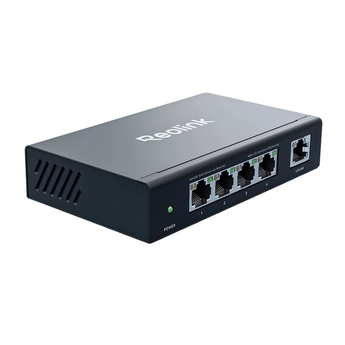


Reolink RLA-PS1E 5-Port Gigabit PoE Switch (65W)
HK$399.00
/
Pickup available at Elechid
Usually ready in 24 hours
A fanless 5-port switch that adds four PoE+ ports to a Reolink camera setup, powering each PoE camera over one cable and connecting to your NVR or home network.
Specifications
| Ports | 4 × 10/100/1000 Mbps PoE+; 1 × 10/100/1000 Mbps uplink |
|---|---|
| PoE standard | IEEE 802.3af / 802.3at |
| PoE power | Up to 30W per port; 65W total budget |
| Extend Mode | Ports 1–2 limited to 10 Mbps, PoE distance up to 250 m (Cat5e cable required) |
| Recovery Mode | Detects and reboots offline or unresponsive PoE devices |
| Protection | 4KV surge protection; power management shuts ports from Port 4 down if total draw exceeds 65W |
| Cooling | Fanless |
| Power | Adapter 52V 1.25A 65W; input AC 100–240V |
| Operating environment | -10°C to 45°C, 10–90% humidity (non-condensing) |
| Size / weight | 125.5 × 76.8 × 25.5 mm; 234 g |
Warranty and delivery
This is Hong Kong licensed stock, covered by the local distributor's warranty; the period is shown on the warranty card in the box. Brand new. Kwun Tong collection is by appointment; confirm availability and a collection time before travelling. No demonstrations or product trials are provided.
Delivery by SF Express, freight collect. Free self-collection at our Kwun Tong shop (11:00–19:00). For other arrangements, please WhatsApp us.
Related buying guides
- NVRs & security camera accessories
- Hong Kong CCTV buying and setup guide
- Returns and refund policy
- Shipping policy
Further reading: PoE Switch Buying Guide: Ports and CCTV Power Budget.
When it arrives: first setup and checks
- Before opening or fitting, match the exact camera model, accessory part number, connectors and capacity or power requirements. Similar appearance does not establish compatibility.
- Fit the accessory as instructed. For power, wall mounting or outdoor connectors, check load, cable routing and weatherproofing requirements. A solar panel must match the camera's supported input and connection.
- Recheck output voltage, current, polarity and plug before connecting. Verify power or charging as instructed; power alone does not establish a network connection or active recording.


