


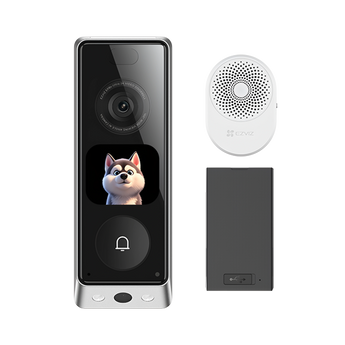


EZVIZ EP8 Ultra Dual-Lens Video Doorbell Kit with AI Screen
- Home entrances
- Answer visitors
Pickup available at Elechid
Usually ready in 24 hours
EZVIZ EP8 Ultra doorbell kit: 6MP + 2MP dual lenses, AI interactive screen, 32GB built-in storage, two swappable 9,600 mAh batteries and a chime.
Suitable uses
Suitable for a home or small-office entrance where you want to see visitors and respond to the doorbell from a phone. Check mounting space, network coverage and the battery, doorbell wiring or PoE requirements specified for this version.
Key features
- 6MP + 2MP dual lenses: The top lens covers visitors with a 162° diagonal view, while the bottom lens watches the ground for parcels. Pre-roll recording on the top lens captures the seconds before motion is detected (off when colour night vision is on).
- Interactive screen and video calls: Animated characters on the doorbell screen greet visitors, and you can take a two-way video call, use audio only or set quick auto-replies. A voice changer is available for privacy.
- Swappable batteries and built-in storage: Two detachable 9,600 mAh batteries let you swap in a charged one, or the doorbell can be wired to 8–24 V AC. Clips save to 32GB of built-in eMMC storage with no card needed.
Specifications
| Top camera | 6 MP (2464 × 2464); 2.0 mm F1.6; 162° diagonal |
|---|---|
| Bottom camera | 2 MP (1920 × 1080); 1.8 mm F2.4; 88° diagonal |
| Sensor and frame rate | 1/2.8" CMOS; 15 fps; H.265 / H.264 |
| Night vision | IR up to 6 m; colour night vision within 1 m |
| Motion detection | PIR 100°, up to 6 m (5 sensitivity levels); AI human, package and familiar-face recognition |
| Storage | Built-in 32GB eMMC; EZVIZ CloudPlay (subscription) |
| Screen size | Not published |
| Wi-Fi | 802.11b/g/n, 2.4 GHz |
| Power | 2 × 9,600 mAh detachable batteries (one spare); 8–24 V AC wiring or USB-C 5 V; max. 3 W |
| Chime | Indoor chime included; also works with existing 8–24 V AC mechanical or electronic chimes |
| Weather resistance | IP65; -20°C to 50°C |
| Doorbell size | 155 × 54 × 35 mm (from EZVIZ dimension drawing) |
In the box: Doorbell, mounting bracket, inclined mounting bracket, drill template, chime, battery ×2, USB-C cable, pin, screw kit, U-shaped wire ×2, wire connector ×2, regulatory information ×4, quick start guide, monitoring sticker
Warranty and delivery
This is Hong Kong licensed stock, covered by the local distributor's warranty; the period is shown on the warranty card in the box. Brand new. Kwun Tong collection is by appointment; confirm availability and a collection time before travelling. No demonstrations or product trials are provided.
Delivery by SF Express, freight collect. Free self-collection at our Kwun Tong shop (11:00–19:00). For other arrangements, please WhatsApp us.
FAQ
Do I need an electrician to install it?
Not necessarily: it can run on its batteries with the included bracket and screws. Wiring it to 8–24 V AC or an existing chime should be done by a qualified person; installation is not included.
Related buying guides
- EZVIZ EP3x Dual-Lens 2K Battery Video Doorbell Kit with Chime
- EZVIZ EP4 4K Wire-Free Smart Door Viewer with 5.5" Touch Screen
- EZVIZ DL50FVX Dual-Camera Face & Palm Vein Smart Door Lock
- Hong Kong CCTV buying and setup guide
- Returns and refund policy
- Shipping policy
- Smart Peephole vs Video Doorbell: Hong Kong Guide
- Export and Back Up CCTV Footage: App, NVR and Cloud Guide
Choosing a monitoring system? Read our Hong Kong home CCTV buying guide to compare power, connectivity and recording options, or browse video doorbells and security cameras.
When it arrives: first setup and checks
- Power up in an accessible position, charging battery models as instructed, and check package contents. Use the exact model's manufacturer instructions and app prompts to add it. Do not substitute another version's pairing or reset procedure.
- Use this model's supported Wi-Fi band, Ethernet or base-station connection. Pair near the router where appropriate, then check signal at the intended position before fixing it in place.
- Configure account/device security and viewing permissions using this model’s supported settings. Check date, time, notifications and framing. For doorbells or viewers, also check door-hole size, thickness, fixings, chime compatibility and property installation requirements.
- Enable a supported card, NVR/hub or cloud recording method. Test recording, playback and storage location before permanent mounting. Live view does not mean recording is active. Battery models do not all support continuous recording.
Setup reference: EZVIZ manufacturer setup and support Choose the matching model and hardware version. This self-setup checklist does not include on-site or done-for-you setup services.


