


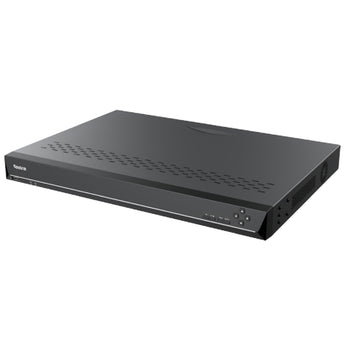


Reolink RP-N64 64-Channel NVR (4 Drive Bays, No PoE)
- Home systems
- Shop systems
- Multiple entrances
Pickup available at Elechid
Usually ready in 24 hours
Reolink RP-N64 rack-mountable NVR: up to 64 cameras, 4 SATA bays for up to 80TB, dual HDMI, 8 alarm inputs and 4 outputs, on-device AI video search.
Suitable uses
Suitable for a shop or small office that needs to view several compatible cameras and keep footage locally. Plan around physical ports, supported channels, drive configuration and camera compatibility; use the power arrangements specified on this page.
Key features
- 64 channels via switches: Eight gigabit downlink ports connect to PoE switches (the NVR itself supplies no PoE), plus one gigabit LAN/WAN port. Reolink lists all its cameras except 4G models as compatible.
- Four bays, up to 80TB: Each SATA bay takes a drive up to 20TB. Disk Group Mode can reserve drives for important channels, and recordings can be encrypted.
- On-device AI search and alarm I/O: Keyword video search runs on the NVR, even with cameras that lack the feature. Eight alarm inputs and four outputs link sensors, sirens and lights.
Specifications
| Camera inputs | Up to 64 IP cameras, up to 16MP; all Reolink cameras except 4G models |
|---|---|
| Network | 8 × gigabit RJ45 for switches (no PoE); 1 × gigabit RJ45 LAN/WAN; 768 Mbps in / out |
| Video output | 2 × HDMI, up to 3840 × 2160 |
| Audio | 1 × RCA in, 1 × RCA out |
| Video compression / playback | Intelligent H.265+, H.265, H.264; 4-channel playback up to 8MP, or 1 channel above 8MP |
| Storage | 4 × SATA bays, up to 20TB each (80TB total); drives not included; file encryption |
| Alarm / USB | 8 alarm inputs, 4 alarm outputs; 2 × USB 2.0 + 1 × USB 3.0 |
| Smart features | AI video search; heat map; people counting, zone crowd monitoring, perimeter protection, object removal / forgotten object (camera support required) |
| Users | 20 accounts; up to 12 simultaneous streams (2 main + 10 sub) |
| Power / environment | 100–240V AC, 50/60Hz, 1.5A; -10°C to 45°C, 10–90% humidity; three cooling fans |
| Size / weight | 440 × 314.3 × 44 mm; 2.88 kg without HDD; 19-inch rack ears included |
In the box: RP-N64 NVR, 2 rack mount ears, power cable, HDMI cable, 1 m network cable, 4 terminal blocks, USB mouse, operational instruction
Warranty and delivery
This is Hong Kong licensed stock, covered by the local distributor's warranty; the period is shown on the warranty card in the box. Brand new. Kwun Tong collection is by appointment; confirm availability and a collection time before travelling. No demonstrations or product trials are provided.
Delivery by SF Express, freight collect. Free self-collection at our Kwun Tong shop (11:00–19:00). For other arrangements, please WhatsApp us.
FAQ
Can I plug PoE cameras straight into the RP-N64?
Its eight camera ports do not supply power, so PoE cameras need a PoE switch or their own power supply. Reolink also notes fan noise, so an equipment room suits it best.
Related buying guides
- Reolink RP-PN8 8-Port PoE NVR (Up to 12 Cameras)
- Reolink RP-PN16 16-Port PoE NVR (Up to 24 Cameras)
- Reolink NVS4E 4-Channel PoE NVR (HDD Not Included)
- NVRs & security camera accessories
- Hong Kong CCTV buying and setup guide
- Returns and refund policy
- Shipping policy
- Export and Back Up CCTV Footage: App, NVR and Cloud Guide
Choosing a monitoring system? Read our Hong Kong home CCTV buying guide to compare power, connectivity and recording options, or browse NVRs and camera storage hubs.
When it arrives: first setup and checks
- Check the exact recorder or hub model, hardware version, package contents and installed storage. A drive-free model needs separately purchased supported storage. Follow its instructions for power, router and any required display connections.
- Initialise the device using its manufacturer workflow, set a device password in your own account and add supported cameras. The same brand or an Ethernet socket alone does not prove compatibility.
- Check each camera's date, time and recording schedule. Make a test recording, play it back and try exporting a clip. Retention varies with camera count, bitrate, recording mode and usable storage.
Back up footage before formatting or resetting. NVR and Home Hub setup screens and supported features differ.
Setup reference: Reolink manufacturer setup and support Choose the matching model and hardware version. This self-setup checklist does not include on-site or done-for-you setup services.


