


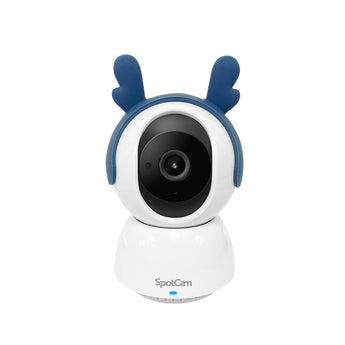


SpotCam Mibo 2K Pan-Tilt Pet Camera
- Home monitoring
- Pet monitoring
- Indoor shops
Pickup available at Elechid
Usually ready in 24 hours
SpotCam Mibo: 2K indoor pet IP camera with 360° pan, 90° tilt, pet and person tracking, two-way audio, Wi-Fi or Ethernet, and 24-hour cloud recording.
Suitable uses
Suitable for everyday monitoring in a living room, bedroom, pet activity area or small office. Remote camera movement lets you check different directions; plan nearby power, connectivity and privacy needs.
Key features
- Follows pets and people: Mibo pans 360° and tilts 90°, and can turn automatically to follow a detected pet or person. You can also steer it yourself from the app.
- Wi-Fi or Ethernet: Connect over 2.4 GHz Wi-Fi, or plug in a network cable to the 10/100 Mbps Ethernet port if your Wi-Fi is weak where the camera sits.
- Talk-back, siren and accessories: A built-in microphone, speaker and siren let you listen, talk and sound an alarm. SpotCam supplies a deer-ear headband, flexible stand and magnetic base for different placements.
Specifications
| Resolution / video | 2K (2304 × 1296) at 30 fps; H.264 |
|---|---|
| Field of view | 115.3° diagonal |
| Pan / tilt / zoom | 360° pan, 90° tilt; 8x digital zoom |
| Night vision | 6 high-power infrared LEDs |
| Detection | Motion and sound alerts; pet tracking and person tracking |
| Audio | Built-in speaker and microphone; two-way audio; built-in siren |
| Network | 802.11 b/g/n 2.4 GHz Wi-Fi or 10/100 Mbps Ethernet (RJ45) |
| Cloud recording | Free 24-hour SpotCam cloud plan; optional paid Pet Care AI service (bark/meow detection, virtual fence, video diary) |
| Viewing | iOS / Android app; web browser on PC or Mac |
| Power | 5V 2A (adapter and 2 m cable included) |
| Size / weight | Ø7 × 10.4 cm; 183 g; indoor use |
In the box: Mibo camera, wall-mount kit, 2 m power cable, 5V 2A power adapter, quick start guide; SpotCam also lists a deer-ear headband, flexible cable stand and magnetic base as included accessories
Warranty and delivery
This is Hong Kong licensed stock, covered by the local distributor's warranty; the period is shown on the warranty card in the box. Brand new. Kwun Tong collection is by appointment; confirm availability and a collection time before travelling. No demonstrations or product trials are provided.
Delivery by SF Express, freight collect. Free self-collection at our Kwun Tong shop (11:00–19:00). For other arrangements, please WhatsApp us.
Related buying guides
- Reolink E331 5MP Pan-Tilt Indoor Wi-Fi Camera
- Reolink E1 Zoom 4K 8MP Indoor PTZ Wi-Fi Camera with 3x Optical Zoom
- SpotCam Pano 3 180° Fisheye 1080p Indoor Wi-Fi Camera
- Security cameras
- Hong Kong CCTV buying and setup guide
- Returns and refund policy
- Shipping policy
- Pet Camera Buying Guide Hong Kong: Tracking, Night View and Recording
- IP Camera Security Settings: Passwords, Sharing and Privacy
- Subscription-Free CCTV Hong Kong: Local vs Cloud Recording
- Elderly Care Camera Guide Hong Kong: Viewing, Talk and Privacy
- Business CCTV Privacy in Hong Kong: Audio, Access and Retention
- CCTV Notices in Hong Kong: Wording and Placement
Choosing a monitoring system? Read our Hong Kong home CCTV buying guide to compare power, connectivity and recording options, or browse security cameras and IP cameras.
When it arrives: first setup and checks
- Power up in an accessible position, and check package contents. Use the exact model's manufacturer instructions and app prompts to add it. Do not substitute another version's pairing or reset procedure.
- Use this model's supported Wi-Fi band, Ethernet or base-station connection. Pair near the router where appropriate, then check signal at the intended position before fixing it in place.
- Configure account/device security and viewing permissions using this model’s supported settings. Check date, time, notifications and framing.
- Enable a supported card, NVR/hub or cloud recording method. Test recording, playback and storage location before permanent mounting. Live view does not mean recording is active.
Setup reference: SpotCam manufacturer setup and support Choose the matching model and hardware version. This self-setup checklist does not include on-site or done-for-you setup services.


