


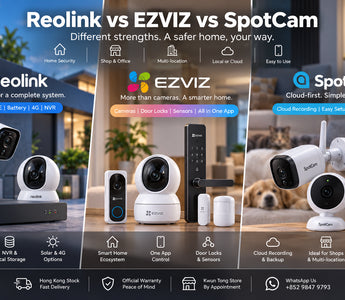
Choose between Reolink, EZVIZ and SpotCam by installation location, power, network and recording storage, then check the complete model. Each brand has different product lines: shared branding does not establish recorder, memory-card or cloud-plan compatibility.
This comparison uses published information to explain buying choices. It is not a hands-on image-quality, night-vision or app-speed test, or a brand-wide performance ranking.
1. Where each brand sits
| Reolink | EZVIZ | SpotCam | |
|---|---|---|---|
| Strength | PoE systems, with battery, solar and 4G options to compare by model | Smart-home ecosystem — cameras, locks, sensors and doorbells in one app | Cloud recording; simple hardware that is easy to relocate |
| Recording routes to check by model | Card recording, PoE NVR, Home Hub or cloud options exist across the range; check the chosen camera's compatibility | Card recording, X5S or R5C recording, and CloudPlay are model-dependent options | Check the camera's cloud recording conditions; battery kits also require the matching base station |
| Best suited to | Village and detached houses; many cameras recording continuously | Homes that want cameras alongside locks and sensors | Rented shops, multiple branches, anyone who would rather not house a recorder |
2. The real difference: where the footage lives
Reolink — local recording as the backbone
Reolink's range runs from cameras through recorders, PoE switches, adapters and junction boxes, so a whole system comes from one place. For longer local recording history, check a compatible PoE camera and recorder combination such as the NVS8 with 2TB drive; for supported wire-free battery-camera models, the Home Hub Mini can centralise storage. Confirm the hub's camera compatibility list before pairing. For cloud recording, check the supported camera models, account region and retention conditions of the Reolink Cloud plans before choosing one.
EZVIZ — the camera is the entry point
EZVIZ also offers cards, the X5S wireless NVR, the R5C home NAS/NVR and CloudPlay. What sets it apart is what else joins the same app: smart door locks, door and window sensors, motion sensors, a smart door viewer and the SD7 touchscreen hub. These products sharing an app does not mean every camera works with every recorder or automation. Check each camera's X5S/R5C compatibility and CloudPlay availability for its region. The listed Zigbee sensors need the A3 gateway; confirm the supported device and automation combination.
SpotCam — cloud first
Off-device cloud recording can keep already-uploaded footage available if the camera is damaged or removed, subject to the service's retention and account conditions. Compare Cloud NVR plans by supported model, recording type and retention period, alongside the matching base-station battery kits (Solo Pro kit). For a shop or office that may relocate, check what camera, base station and internet connection must move, and whether the cloud account can continue at the new address.
3. Ecosystem: what might you add later?
- Locks, sensors, a wall display → EZVIZ is a candidate for a shared-app setup; confirm the exact devices, gateway and supported automations. The 3D face and palm-vein models are in smart door locks.
- More cameras, more channels, solar → Reolink offers several routes to compare: the Argus battery series, the Go 4G series and PoE bullets and domes, with mounts, junction boxes, solar panels and switches from the same brand.
- Baby, pet or shop monitoring → SpotCam has purpose-built models: BabyCam Pro, Mibo pet camera, MD1 vandal-resistant dome.
4. Three buying routes: narrow the equipment before the brand
Home with several cameras: choose local storage or cloud first
For a living room with power and reliable Wi-Fi, compare the E1 Zoom 4K, H6c Pro 3K and Eva Pro examples below. Choose E1 Zoom when its 3x optical zoom and supported local storage meet the task; compare H6c Pro 3K when its indoor functions and EZVIZ management suit the household. Compare Eva Pro when off-device cloud history is the priority and the connection can sustain uploads. These choices are based on documented features, not measured superiority.
For several compatible Reolink cameras, the Home Hub package with 64GB microSD is a central-storage candidate. It does not power every camera or make battery models record continuously. Check the actual Home Hub list: 4G cameras and E1 Zoom hardware IPC_515SD6 are excluded. The current 4K E1 Zoom listing is not proof of an older unit’s version.
Shop needing a continuous timeline: select the recording system
Start with the required views, recording schedule and retention, then shortlist wired cameras and a supported recorder. For a broad entrance overview, compare Duo 3 PoE 16MP panoramic camera against the actual NVS8 hardware and firmware before ordering. Spare PoE ports do not prove support for every resolution, lens stream or smart event. A panoramic view is not a guarantee of face identification at the till.
The EZVIZ X5S and R5C links above are alternative recorder directions only after exact camera compatibility is established. Eva Pro’s cloud route may suit a shop that accepts its retention and internet requirements, but do not transfer the PT1 memory-card specification to Eva Pro. Choose a camera that meets each position’s indoor/outdoor conditions; an indoor camera does not become suitable for a kitchen’s heat or steam simply because it uses the same app.
Prefer cloud: check the exact plan before paying
Compare device count, continuous versus event recording, rolling history, service region and activation. SpotCam’s Eva Pro announcement describes included rolling 24-hour continuous cloud history; that is not 7- or 30-day retention. Ring/Solo battery plans follow their own conditions. For Reolink Cloud and EZVIZ CloudPlay, confirm the exact model and account-region eligibility. Do not assume a subscription covers a second device or remains available after connecting a camera to a Hub/NVR.
For each route, make a list of camera version, power, network, recording destination, included storage and required additions. Reuse the model-specific sources and product links in this article; unresolved combinations remain unconfirmed. Review the existing local-versus-cloud and multi-camera guides linked below before choosing a full order. Buying guidance and source conditions reviewed on 29 October 2026.
5. Apps, sharing and multiple users
For the chosen model and region, check mobile-app OS support, any desktop/browser viewing route and supported sharing permissions. Three practical notes:
- Mixing brands means mixing apps. Nothing stops you running all three, but you will have three apps and three sets of notification rules. For a home, pick one as the primary system.
- Do not count on cross-brand recorders. Even where a generic protocol is supported, the full feature set — pan-tilt control, AI detection, two-way talk — usually only works within one brand.
- Spend ten minutes on notifications. Use the exact model’s available detection zones, sensitivity and notification controls, then check whether important events reach the intended phone. Available controls differ by model.
6. Warranty: all three are licensed stock here
At Elechid, Reolink, EZVIZ and SpotCam are all Hong Kong licensed stock with brand warranty — not parallel imports. That matters more with cameras than with most categories, because cloud accounts, firmware updates and after-sales support are tied to the region of sale.
FAQ
Can I mix all three brands?
You can, but not as a primary plan. The sensible version is one brand as the main system, plus a second brand for one or two special-purpose cameras such as a pet or baby camera.
Is a cloud plan compulsory?
It depends on the exact camera and the recording history you need. Where a camera supports local card or recorder storage, that route may work without a cloud subscription; hardware and storage still have an upfront cost. For a cloud-first model, check whether free recording is included, whether it is continuous or event-only, and how long clips remain available. Longer retention or additional features may require a paid plan. A cloud-first design alone proves neither that paid service is compulsory nor that local storage is supported.
Which brand has the best night vision?
Judge by model, not brand. Infrared night vision is monochrome; full-colour night vision needs a brighter aperture or a built-in light. All three make full-colour models — look for ColorX, full-colour or spotlight wording on the individual product page.
I already own one brand and want more cameras. What now?
Staying in-brand is simplest, especially if you already have a recorder. For a completely separate location — a car park, a shop — a different brand is fine, since it is a standalone setup anyway.
Exact-model examples: three indoor cameras
These examples illustrate different buying requirements, not a matched-price hands-on ranking. Confirm power and placement before choosing recording storage.
Reolink E1 Zoom: separate current 4K and older hardware
E1 Zoom 4K 8MP indoor pan-tilt camera is a candidate for mains-powered indoor use, 3x optical zoom and local storage. The current official page lists microSD up to 512GB; do not apply this to every older E1 Zoom. The Home Hub list specifically excludes IPC_515SD6 hardware. Check hardware, firmware and UID before ordering; 4G cameras are not Home Hub-compatible. Cameras added to a Hub also cannot be assumed to retain standalone Reolink Cloud support.
EZVIZ H6c Pro: 3K is a specific version
H6c Pro 3K indoor Wi-Fi pan-tilt camera is a candidate where an outlet, dual-band Wi-Fi and memory-card recording suit the room. Official model CS-H6c-R105-1J5WF lists 2880×1620, microSD up to 512GB and 5V/2A Type-C power. Its RJ45 network port does not establish PoE power support. Check 1080p, 2K and other hardware versions separately, and confirm CloudPlay eligibility for the selected model and account region.
SpotCam Eva Pro: distinguish retention and connectivity
Eva Pro 2K indoor pan-tilt cloud camera is a candidate for households prioritising cloud recording. Its official announcement specifies 2K, pan-tilt and Wi-Fi/Ethernet connectivity. A free rolling 24-hour history is not free 7- or 30-day retention. Do not transfer the PT1 microSD specification in the same announcement to Eva Pro, or apply mains-powered cloud-camera plans to Ring/Solo battery models. Remote uploads still require power and working internet; cloud recording is not an offline recording guarantee.
Source review: 29 October 2026. The manufacturer documents below establish published specifications and limitations. Elechid sells the products mentioned. Confirm the exact supply version, cloud plan and warranty terms; no three-brand hands-on testing is claimed.
- Reolink E1 Zoom — current 4K model specifications
- Reolink Home Hub compatibility — hardware and firmware exceptions
- Reolink Cloud — model and country availability
- EZVIZ H6c Pro 3K — CS-H6c-R105-1J5WF specifications
- SpotCam Eva Pro / PT1 official model announcement
- SpotCam microSD support — check the exact model
- SpotCam Ring / Solo — model-specific cloud plans
Next steps
If you have not settled on power type and storage yet, start with our home CCTV guide; for the cards these cameras need, see the memory card guide; and if Wi-Fi cameras keep stuttering, the cause is usually coverage — see the router and mesh guide. The full camera range is in security cameras, with recorders and accessories in NVRs & accessories.
Please confirm stock, delivery timing and collection arrangements before ordering. Our Kwun Tong location is for stock and collection. For help sizing a system, WhatsApp +852 9847 9793.
Choose by the recording requirement, then confirm the brand model
For a renter who wants remote household checks, shortlist an indoor model only after deciding whether cloud retention or local recording is the priority. For a shop that needs a continuous timeline, begin with the supported recording mode and compatible recorder, not the brand name. For a site without fixed internet, check power and the exact 4G model before comparing subscription plans.
Keep three decisions separate: what is recorded, where it is retained, and who can retrieve it. A cloud-first preference does not remove the need for working power and internet. Local storage does not automatically give remote access during an outage. A brand with both battery and wired products should not be assigned one universal recording behaviour.
Use the model-specific source links already listed above and keep a shortlist containing the full camera code, recording destination, required retention and any subscription. Compare local versus cloud CCTV recording costs and dependencies and shop CCTV planning for the next decision. None of these directions is a three-brand hands-on test or a universal winner.
Buying guidance reviewed on 27 October 2026. Product availability, regional versions and current prices must be confirmed on the linked product pages.
Buying several models: separate four kinds of compatibility
You can buy cameras from different brands for separate positions, provided each meets its own power, network and recording requirements. That does not establish a combined system. Before ordering, write down whether you want one phone app, simultaneous multi-camera viewing, central recording or one subscription. These are four different requirements and each needs confirmation for the exact models and versions.
One app: supported products in an ecosystem may be manageable through the same app, but available screens, sharing roles and playback can differ. A mixed-brand purchase can mean separate apps and separate owner accounts. Choose who will administer each account and check that the intended family member can find a recording without relying on the administrator’s password.
One recorder: confirm camera model, recorder hardware and firmware, supported streams, event functions and recording modes. The same logo does not establish universal NVR or hub compatibility. ONVIF support, where applicable, does not promise that audio, smart detection and multi-lens features all work together. Use the camera and NVR planning checklist and the manufacturer references already listed above.
One cloud plan: count supported cameras and check service region, retention, account conditions and activation. Do not assume one camera’s subscription covers another camera, even in the same brand. Store plan terms and the exact camera’s app support must match.
One monitoring task: an indoor pet view, a doorway visitor view and an outdoor overview can justify different designs. Pick a model for each task before trying to simplify management. If one app or central playback is essential, use that requirement to narrow the shortlist before paying. If separate apps are acceptable, keep a note of where each camera stores footage and how to export it.
For a simple location sheet, read how to choose several home cameras by room and position. This is buying guidance, not confirmation that every product mentioned in the two articles works as one recorder system.


